
Web terminal
Nothing to install. Chrome, Edge, Firefox and Safari on any computer, tablet or phone.
Open in the browserApps
The same terminal and the same account in your browser, on your Android phone and on your Windows PC. Your charts, drawings, alerts and plan follow you everywhere.
Nothing to install. Chrome, Edge, Firefox and Safari on any computer, tablet or phone.
Open in the browserThe whole terminal like a trading app, with phone notifications for signals and alerts and a fingerprint lock. Android 6 or newer.
Coming soonThe terminal in its own window with a Start menu shortcut. Windows 10 or 11; installs and updates itself.
Coming soonAndroid app
A full charting app, made for ICT and VSA. Everything the web terminal does, plus what only a phone can do.
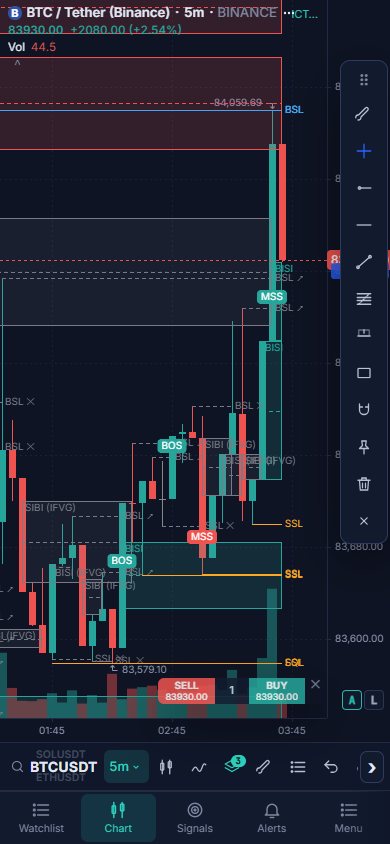
On your phone open this page and press Download APK (about 50 MB).
Tap ICC_Charts.apk in the browser's downloads or in the notification.
If Android asks, press Settings, switch on Allow from this source, and go back. Play Protect may ask too: Install anyway.
Press Install, then Open. The ICC Charts icon is now on your home screen.
Continue with Google or Facebook. The sign-in opens in your browser and comes back to the app by itself.
Press Allow when the app asks, so signals and alerts reach you even when the app is closed.
In the app open Alerts (or Signals) → Send alerts to my phone → switch on Phone app and Model signals too.
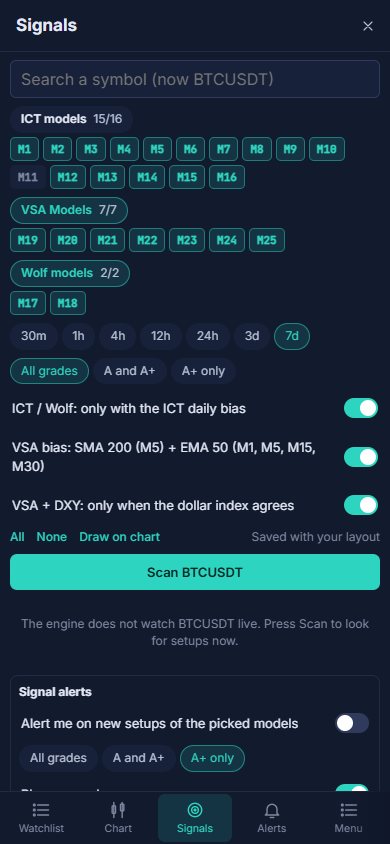
Open Signals, tap ICT models, VSA Models or Wolf models to select a whole family, then Scan.
Tap the hub button on the chart toolbar → INFO → Help & guide. The guide and the FAQ open inside the app.
Windows app
No browser tabs, a Start menu shortcut, and updates that install themselves. Windows 10 or 11 (it uses Microsoft Edge WebView2, which Windows already has).
Press Download for Windows (ICC_Charts_Windows.exe, about 13 MB).
If SmartScreen shows Windows protected your PC, press More info → Run anyway.
The first run adds ICC Charts to the Start menu and the desktop, then opens it in its own window.
Sign in once. Update available installs a new version and reopens the app by itself.
Web terminal
The web terminal is the full product. The apps show the same terminal, so everything below works everywhere.
Open chart.iccterminal.trade/chart, continue with Google or Facebook (or as a guest) and pick a market.
The ICT menu draws FVGs, order blocks, liquidity, structure, sessions, key levels and the daily bias.
The Signals tab lists the setups of 25 ICT, Wolf and VSA models with entry, stop and targets.
Layouts with sync, templates, the Save menu, snapshots and a clear chart legend.
Price, trend line, zone, session, ICT event and indicator alerts to your phone, Telegram, WhatsApp, email or a webhook.
Bar replay with practice trading, paper trading and the strategy tester, without real money.
Compare
Telegram, WhatsApp, email and webhook alerts are sent by the server, so they work with all three.
Yes. The apps are free; they use your ICC Charts account and its plan, the same as the website.
For now it is downloaded from this website. Android calls that an unknown source and asks you to allow it once; that is normal for apps installed outside the Play Store.
An older copy with a different signature may be installed: uninstall ICC Charts, then install the new APK. Also check that the phone has about 150 MB free.
Allow notifications for ICC Charts in the phone settings, sign in to the app, and in the terminal open Alerts → Send alerts to my phone and switch on Phone app (and Model signals too). On some phones also allow ICC Charts to run in the background in the battery settings.
When a new version is out, the app shows Update available. Android: press Update, then tap the finished download and Update; your login stays. Windows: the app downloads, installs and reopens itself.
SmartScreen warns about new programs it has not seen often. Press More info → Run anyway. Download the app only from chart.iccterminal.trade.
No. The web terminal at chart.iccterminal.trade/chart works in any modern browser. The apps add phone notifications, the fingerprint lock and a window of their own.
Yes. Charts, drawings, indicators, watchlists, alerts and your plan follow your account to every device.